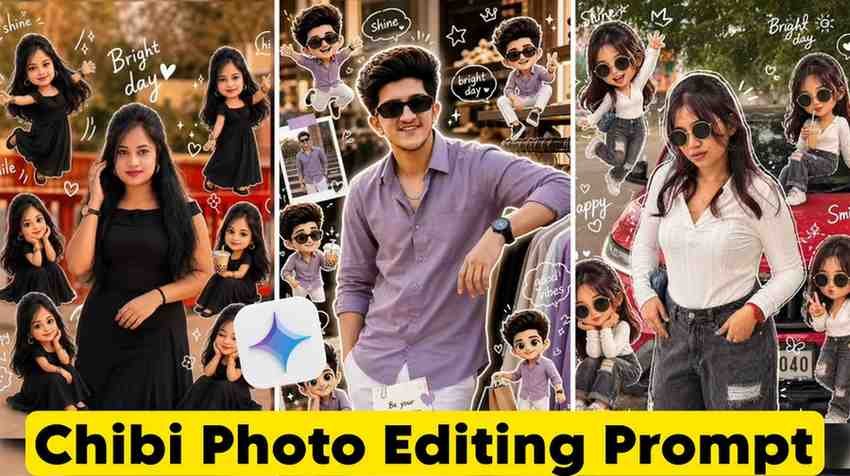
Many people are going viral on Instagram using Chibi cartoon style AI photo editing prompts. Do you also want that viral look for your photos. Then this article is just for you.
Many people think that you need Photoshop or a designer for this work. Actually you do not need anything. Just one correct prompt and Gemini. That is all.
What is AI Chibi Cartoon Style Photo Editing
The word Chibi comes from Japan. In the Japanese language chibi means small or cute. The cute characters with small bodies and big round eyes seen in anime or manga are called chibi style.
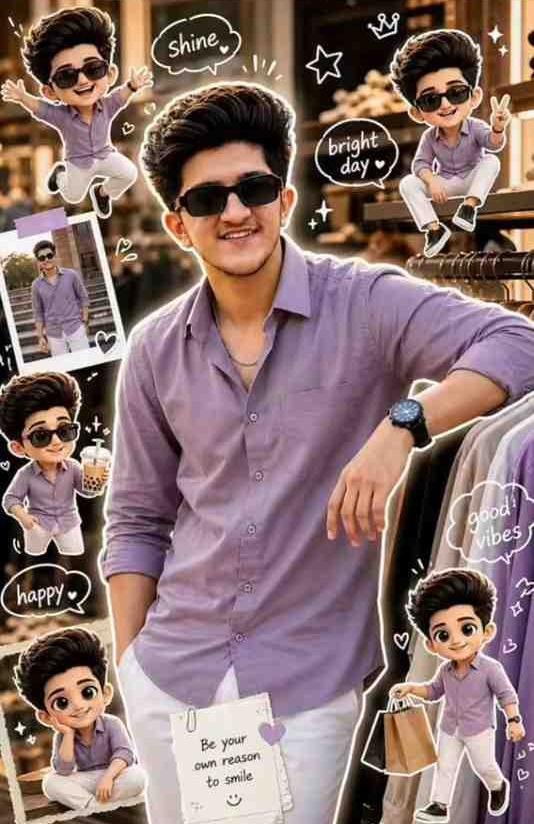
Now the chibi cartoon style photo editing done with AI transforms your real photo into that cute 3D cartoon look. This means your face and your clothes will stay but you will look like an adorable cartoon character.
This work is done with an AI photo editing prompt. You upload your photo to Gemini and give the right prompt. Then AI changes the photo into chibi style. No editing skill is needed and you do not have to buy any app.
This is what is now trending as chibi cartoon style AI photo editing on social media.
The Secret Behind Trending Chibi Style AI Photo Editing Prompts
There is only one secret behind the chibi photos getting lakhs of likes on Instagram. That is the correct prompt.
When I sat down to do this editing for the first time I was really disappointed. I gave the photo to Gemini and wrote make it chibi cartoon. What came out made me sad. The photo was not a cartoon and it was not real.
Then I understood that the problem was in the prompt. AI does not understand what you want if you just say make it chibi. But when I gave a detailed prompt about how much 3D it will be or how the eyes and background and lighting will look the result surprised me.
This is the real secret. The more details you have in the AI chibi cartoon style photo editing prompt the more professional and Instagram worthy the photo will be.
Writing only chibi is not enough. You have to say 3D render and soft lighting and large expressive eyes and cute proportions and pastel background and high detail. AI understands when you give these specific words.
Best Chibi Style AI Photo Editing Prompts
I have tested these prompts many times myself. Many of these did not work at first but I fixed them with small changes. So these are not just theory. These really work.
To get these prompts copy them from the link given in the picture below. If you have trouble copying then comment and I will send them in the comment. I have nothing to hide from you. I made these prompts for you.
How to Use 3D Chibi Cartoon AI Photo Editing Prompt to Create Photos
The method of making these chibi photos is so easy that you will remember it after doing it once. I am telling you step by step.
- First step. Copy one prompt of your choice from the prompts I gave above.
- Second step. Open the Gemini app. Click the plus button at the bottom where you type. Select the gallery option and upload your photo.
- Third step. When the photo is uploaded paste the copied prompt in that typing box.
- Fourth step. Send it and wait for just a few seconds.
- That is it. Your 3D chibi cartoon AI photo editing is ready.
Let me tell you one thing. If you do not like the result the first time do not be sad. It did not happen for me the first time either. If you add more cute or softer colors or bigger eyes in the prompt the difference will come. This is a game of trial and error but the fun is here too.
Unique Features of Chibi Style AI Photo Editing Prompt
Why are these chibi style photo editing prompts different from all other editing. It is important to know this because then you can make new prompts yourself.
- 3D depth and texture. Where normal cartoon filters look flat the photos made with chibi style AI prompts have a real 3D feel. Light falls on the hair and there are folds in the clothes and soft shadows on the cheeks.
- Expression is preserved. This is the biggest benefit. Your smile and the folds of your eyebrows stay. Even though the photo is a cartoon people can tell it is you.
- Background customization. If you change the background in the prompt the same photo is made with different backgrounds. Someone likes pastel sky and someone likes city lights and someone likes simple gradient. You will not get this flexibility in any other filter.
- Instagram ready output. The photos made with these prompts can be posted directly on Instagram. No extra editing is needed. Color and sharpness and detail are all ready.
- The most important thing is that it costs no money. Gemini can be used for free. So chibi style 3D cartoon AI photo editing is now within reach for everyone.
My Own Experience. Where I got stuck and how I came out.
To be honest I faced a few problems while learning this chibi cartoon style AI photo editing. I want you to not make the same mistakes.
The first problem was photo quality. I first gave a screenshot photo. The result looked like AI could not recognize the face. Later I understood that a good quality clear photo gives a good chibi cartoon. If you give a blurry photo AI gets confused.
The second problem was the language of the prompt. I gave the prompt in Bengali. It did not work. Gemini understands English prompts much better. So always give prompts in English.
The third problem was asking for too many things at once. I wrote make it chibi and add wings and change background to forest and make eyes blue and add sparkles. AI could not process so many things together. The result was a mess. Later I learned that it is not right to give more than 3 or 4 instructions in one prompt.
The fourth problem was patience. If it was not good the first time I gave a new prompt immediately. But later I understood that many times a better result comes just by clicking regenerate. AI gives a slightly different result every time from the same prompt. So it is important to try 2 or 3 times.
If you can avoid these four mistakes you will get a great chibi cartoon style photo the first time. You will not have to fail 15 times like me.
Conclusion
In today article we saw how to make viral Instagram photos using chibi cartoon style AI photo editing prompts. If you have a free AI tool like Gemini and a correct 3D chibi cartoon style prompt and a little patience you can change any ordinary photo into an extraordinary chibi style cartoon.
AI chibi cartoon style photo editing is not just for pro designers anymore. It is now for everyone. If you know the right prompt this work will be done on your phone.
Copy the prompt and try it in Gemini and share your chibi photo on Instagram. Tell me in the comments how the result was. I will be waiting.
FAQ
1. What is chibi cartoon style AI photo editing.
This is a method where AI prompts are used to turn your real photo into a cute 3D cartoon character.
2. Which app is needed for chibi style AI photo editing.
It can be done with the Gemini app. It is completely free and can be downloaded easily.
3. Where can I find chibi AI photo editing prompts.
They are given in this article. Copy them from the link below the picture. If there is a problem then comment.
4. Do chibi cartoon photos go viral on Instagram.
Yes the photos of this trending chibi cartoon style AI photo editing are getting a lot of engagement on Instagram now.