Today I will show how to make a family photo with all family members together using Gemini.
Many times all family members do not stay in one place. Someone lives outside, so we cannot take a photo together.
If you give separate photos of all family members in Gemini, you can make a new beautiful family photo. I made a mistake when I tried for the first time, but later I got a good photo when I did it in the correct way.
In this writing I will show very easily what you have to do. At the end I will also give an easy Prompt, so that Gemini can make a new photo of all family members just by uploading the photos.
What Is the Gemini AI Prompt for Family Photo?
If you are hearing about this matter for the first time, then very naturally a question can come, what is Gemini AI Prompt for Family Photo actually. If we say in simple words, it is a special direction that you give to Gemini. After that if you upload separate photos of family members, Gemini understands that direction and tries to arrange everyone together in a new family photo. Here you do not have to learn any difficult software. Work becomes very easy if you just have correct direction and clean photos.
Nowadays this type of situation happens in many families where one member is in a foreign country, another person is in another state, again someone stays outside the house for work. It is not always possible to bring everyone in one place on one day and take a photo. Gemini AI has become popular to many people as an easy solution to this exact problem. By using a few separate photos and a good Prompt, a family photo can be created which helps to hold the special moment in a more beautiful way.
Why People Need AI to Create Family Photos
Before this, if you wanted to take a family photo, everyone had to stay in one place. But now many people stay outside the house for work or study. Someone lives in another city, again someone lives in another country. So it is very difficult to get everyone together. For this reason, taking a new family photo is not possible many times. Now many people are doing this work easily with AI.
This happened in our house too. All family members were not together. Someone was busy with work, someone was studying. So we could not take a new photo. Then I used Gemini and gave separate photos of everyone to make a Family Photo. At first the photo was not very good. Later I used good photos and wrote the Prompt correctly to try again. Then the photo became very beautiful.
Using AI saves a lot of time. Before this, if you wanted to take a photo, you had to call everyone. Then you had to look for a photographer. Now if you just have separate photos of everyone, you can make a new Family Photo many times. A beautiful photo can be found within a few minutes. So many people are using this way now.
But one thing you must always remember. A photo made with AI is not like a real photo. The photo that family members take by staying together is the most beautiful memory. But if everyone cannot stay together, then Gemini can give a good help. You just have to use clean photos of everyone. And you have to write easily in the Prompt what kind of photo you want. Then you can get many beautiful results.
What You Need Before Using the Prompt
If you want to use Gemini Prompt to create a beautiful photo of all family members together, then it is very important to know a few small matters before starting. These are nothing difficult. Rather if these are correct at the very beginning, you will not have to try again and again newly later. I did not care about these matters in the beginning. So I did not get a result according to my mind even after creating the same photo a few times. Later when I made every matter correct step by step, then I understood that small preparations make the real difference.
Before everything, collect one clean photo of every member of your family. It is good if the photos are not very old or blurry. The face should be seen cleanly and there should not be extra shadow or light in the photo. If possible, use photos where everyone is looking at the camera. By this Gemini can understand the features of the face well and tries to keep them correct in the new photo.
After that, you must have the arrangement to use Gemini on your phone or computer. Many people use the mobile app, again someone uses it through the browser. Whichever you use, ensure before that that there is the facility to upload photos. Then copy your favorite family photo gemini prompt before itself. By this you will not have to go here and there again and again during the work and the full process will also finish much faster.
I have learned another matter from my own experience. If the photos of family members are taken from completely different angles, then many times the face of someone can look a little different in the new photo. So try to use photos of similar type as much as possible. If you use similar light, clean face and good quality photos, the family photo EDITING prompt works much better. If you take these small preparations at the start, the next steps will seem very easy to you.
How to Create a Family Photo Using Gemini
Now I come to the most important part. Many people think that you must do something very difficult to create this type of family photo. Actually the matter is not like that at all. When I use this method for the first time, I was also feeling a little afraid. But after understanding the full process once, I saw that the work can be finished within a few minutes. If you follow the easy steps below, then you can very easily bring everyone of the family together in a new photo using Gemini Prompt.
First copy your favorite family prompt given in this article. While copying the Prompt, see once that the full text is copied correctly. Because if any part is missed in the middle, Gemini may not understand your direction completely.
After that open the Gemini app or website. Start a new chat there. Now press the plus icon below. Then choose the Gallery or Photos option. Now upload the photos of those members of the family whom you want to see together in one photo one by one. After the photos are uploaded, wait a little so that all photos connect correctly.
Now paste the Prompt in the message box which you copied before. If you want, you can also add a few pieces of information according to your own choice here. For example, everyone should stand side by side, everyone should have a smiling face, the environment of the family should be natural, or your favorite specific background should be used. By this Gemini can understand your need much better and the chance of the result being much more satisfying also stays.
At the end press the Send button. Within a few moments Gemini will try to create a new family photo by analyzing your uploaded photos and Prompt. If the result is not according to your choice for the first time, then there is no reason to be sad. I myself did not get the best result at the first time. Later I made a small change in the Prompt, used some good quality photos and tried again. Then I got a much more beautiful result.
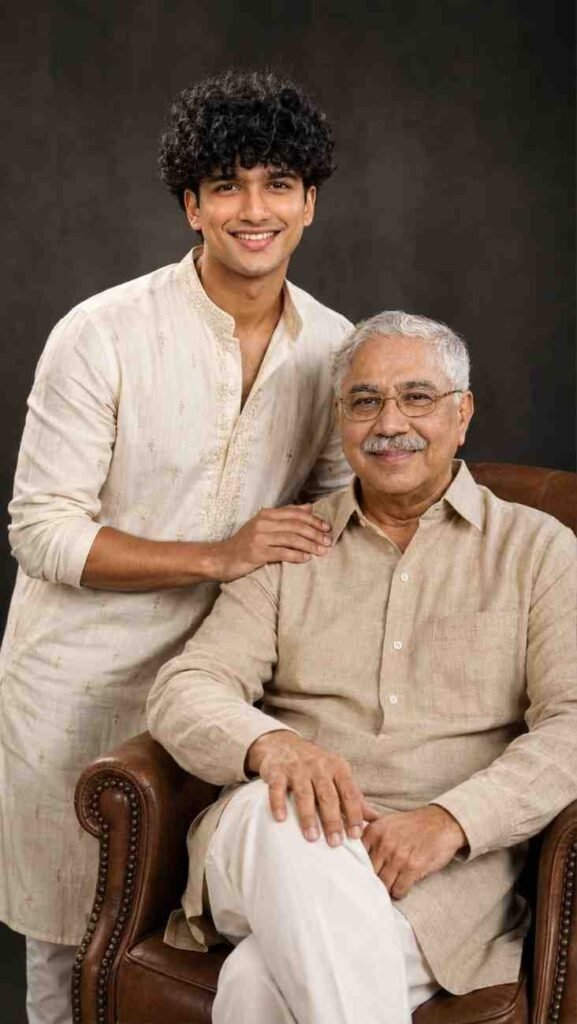
Create a hyper-realistic 8K father-son studio portrait using the uploaded photos. Preserve both faces exactly as uploaded, with no facial changes, beautification, smoothing, or AI distortion. The father is seated naturally in a premium brown leather armchair, while the son stands beside him with one hand gently resting on his father's shoulder. Both have natural, warm expressions and look directly at the camera.

Dress the son in an elegant cream embroidered kurta and the father in a sophisticated beige traditional outfit. Professional DSLR photography, realistic skin texture, detailed eyes and hair, soft cinematic studio lighting, natural shadows, sharp focus, subtle depth of field, premium color grading, photorealistic, emotional father-son bond, luxury dark studio background, professional portrait photography, 8K ultra-realistic quality, 9:16 vertical composition.
Create an ultra-realistic cinematic family portrait in 9:16 vertical, using the uploaded photos with 100% facial identity preservation. Arrange the child in front, mother in the center, and father behind, all looking toward the right with warm, hopeful expressions. Use a dark black-to-navy studio background, soft rim lighting, cinematic depth of field, realistic skin, hair and eyes, HDR lighting, premium color grading, and 8K detail. Add elegant bottom typography: “I LOVE MY” in white serif and “FAMILY” in large glowing golden brush-script. Premium Photoshop-style, emotional, luxury family poster, photorealistic.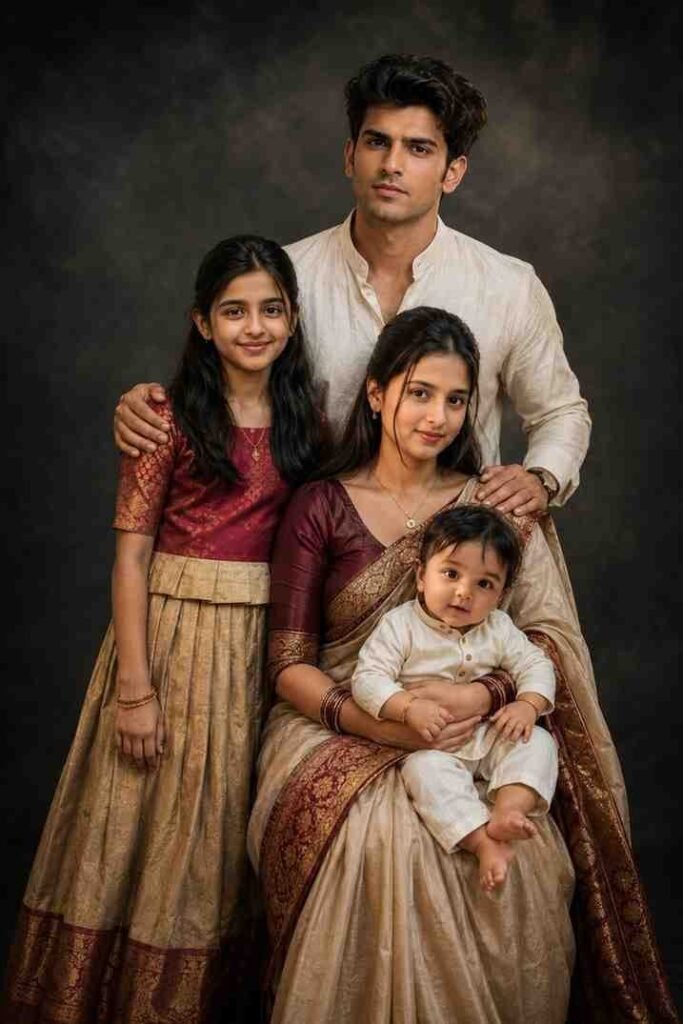
Create an ultra-realistic 9:16 Indian family portrait using the uploaded photos as exact face references.

Use the uploaded photos of the FATHER, MOTHER, DAUGHTER and BABY SON. Preserve each person’s original face, identity, skin tone, hairstyle, age and facial features. Do not mix or change faces.

Create a beautiful traditional family studio portrait: father standing behind, mother sitting in front wearing an elegant traditional saree and lovingly holding the baby son in her lap, while the daughter stands/sits beside them. Natural smiles and affectionate family pose.

Use a premium dark charcoal/black textured studio background, soft cinematic studio lighting, realistic skin and fabric details, elegant traditional Indian clothing, professional DSLR photography, shallow depth of field, sharp faces, natural body proportions, photorealistic 8K quality.

Exactly 4 people only. No extra people, duplicate faces, distorted hands or facial features.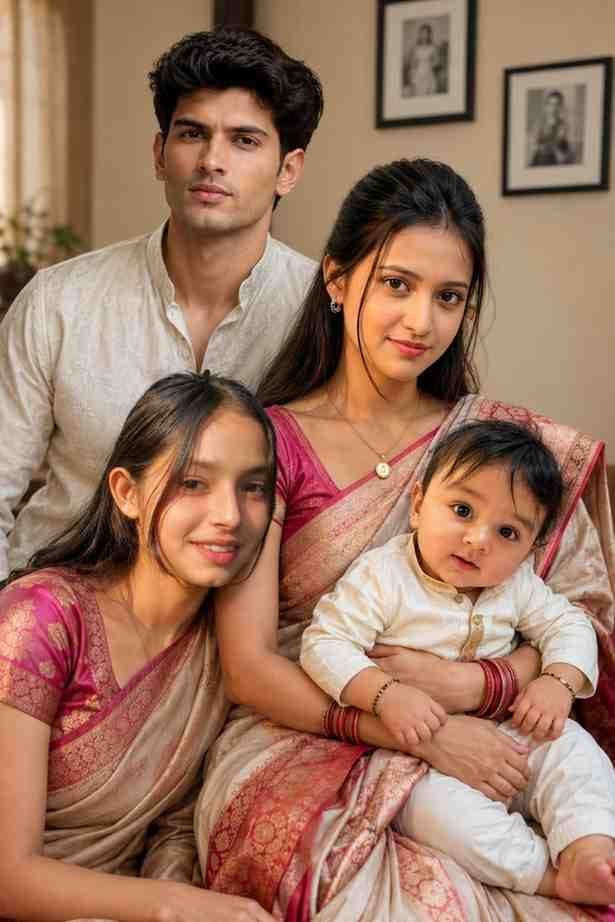
Create an ultra-realistic 9:16 family portrait using the four uploaded photos as exact identity references.

The first photo is the father, second is the mother, third is the daughter, and fourth is the baby son. Preserve their original facial identity, facial features, skin tone, hairstyle and age appearance as accurately as possible.

Show all four together in a warm, elegant indoor family setting. The mother wears a beautiful traditional saree and lovingly holds the baby boy in her lap. The father stands naturally beside/behind them, while the daughter sits closely beside her mother.

Natural smiles, realistic poses, accurate body proportions, authentic Indian family atmosphere. Soft warm lighting, premium DSLR photography, 85mm lens, shallow depth of field, realistic skin texture, cinematic composition, 8K photorealistic quality.

Exactly four people, no extra people, no duplicate faces, no distorted hands or faces.
Best Gemini AI Prompt for Family Photo
Now surely a question is coming to your mind, can a good result be found just by uploading photos. My experience says, no. A beautiful and clean Prompt is very important for a good result. I used many small Prompts in the beginning. Then sometimes the faces of the family members were not staying correct, again sometimes everyone was not looking natural together. Later I understood that the more clearly you can give direction to Gemini, the better the result becomes. So I always use a Prompt where the position of the family members, naturalness of faces, clothes, background and the environment of the photo are written cleanly.
I always notice another matter. There is no such rule that the bigger the Prompt is, the better it is. Rather a Prompt written in short, easy and clean language works much better many times. If you want to see all family members standing together, with a natural smiling face and in a clean environment, then write that directly. If you add unnecessary information, Gemini can move away from the main topic many times. So I always give advice to use a Prompt written in easy language.
When you use the prompt given in this article, you can also make small changes according to your own need. Suppose you want everyone to stand in the garden, or sit inside the room, or wear festival clothes. In that case, it will be enough if you add that information inside the Prompt. By this, it becomes possible to use the same Prompt for different types of family photos. I myself have used the same Prompt at different times by changing it slightly and I have received different types of results every time.
Gemini AI vs Traditional Family Photography
Many people want to know, which one is better between a family photo created with Gemini and a family photo taken with a camera in reality. In my opinion, the work of the two is completely different. If all family members are present in the same place, then the joy of taking a real photo is different. No technology can completely change the smile, story and memory of that moment. But in reality when it is not possible to get everyone together, then Gemini can help as an effective alternative.
I myself know about many such families where one member lives in a foreign country, someone does a job in another city, again someone stays far away for study. It is not easy for them to bring everyone together on one day and take a photo. In this situation, the opportunity to create a new family photo by using separate photos has become a matter of peace to many people. Especially for any family function, birthday or memory, many people are using this method.
But one matter should always be remembered. The photo that Gemini will create will depend completely on your given photos and Prompt. If the photos are not clean or the direction is unclear, then the result may also not be so good. On the other side, a skilled photographer can take photos according to the real situation. So real photo and AI created photo, both have separate importance.
In my experience, if your purpose is to see all family members together in a beautiful memory photo, but everyone is not present in reality, then Gemini can be a very good solution. And if everyone is in the same place, then definitely take a real photo. Because the value of a real moment is always different. I give advice to use both methods according to your own need. By this there is no comparison, rather it becomes easy to take the correct decision according to the situation.
Conclusion
If you have read the full article up to here, then surely you have understood that bringing all family members together in a new family photo using Gemini Family Prompt is very easy now. Where everyone had to be present at the same time in the same place before this, now the work can be started if there is just a separate photo of every member of the family.
I will say only one word from my own experience, do not be sad even if the result is not completely perfect for the first time. I myself have understood after trying a few times that choosing good photos and a Prompt written in easy language are the biggest matters.
The best thing is that it becomes possible to see even the family members who are far away together in one photo in this method. Someone may stay in a foreign country, stay in another state or may not be able to come home for the busyness of work, a new family memory can be created by using their separate photos. So do the work step by step with patience, use good quality photos and write the Prompt cleanly. Then the family photo created by you will look more beautiful and natural.