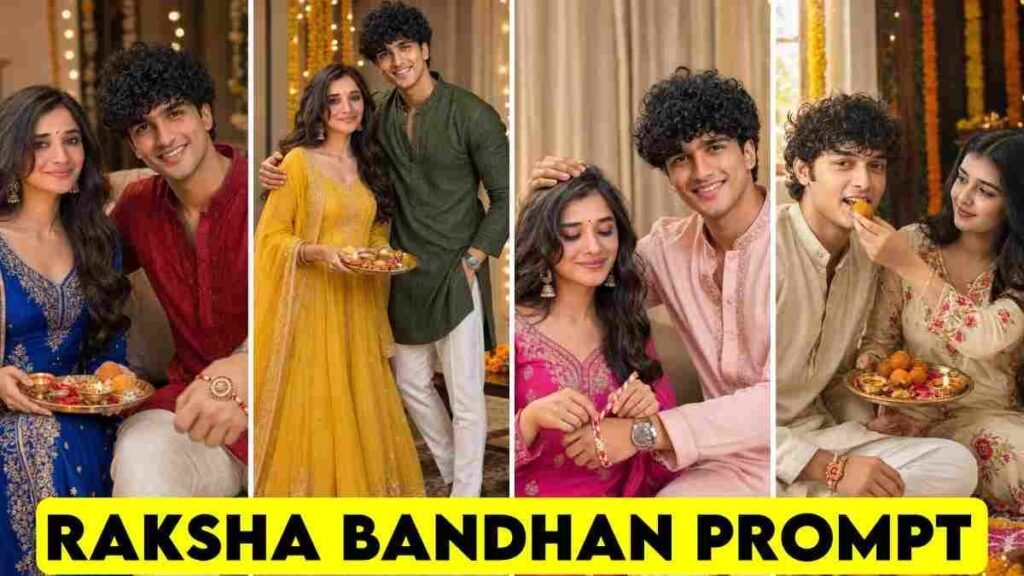
In the article of today, we will see how to easily make special Raksha Bandhan photos using your own picture and the picture of your brother or sister with a Raksha Bandhan AI Photo Editing Prompt.
Raksha Bandhan is coming very soon. At this time, many people want to make a beautiful photo with their brother or sister and post it on social media. But the problem is that not everyone has a good camera or a chance for a good photo shoot.
The same thing happened to me. It was very hard for me to get a good picture of my sister because she is very small. At first, I tried with separate photos, but the result was not good for my mind.
Later, I found a small idea. My sister and I took a selfie together. After giving that photo to the AI, the result came out much better. So in the video of today, I will not only give prompts, I will also tell you in a simple way which photos give good results and where problems can happen. So this article is going to be very important for you. If you read this article until the end, you can also make this kind of special Raksha Bandhan photo editing.
What is a Raksha Bandhan AI Photo Editing Prompt?
To say it simply, this is a piece of writing that tells the AI tool how to edit your photo.
You will give your photo and the photo of your brother or sister. Then you will use a good Raksha Bandhan photo editing prompt. The AI will understand those instructions and try to make a new picture matching the clothes, environment, pose, and feel of Raksha Bandhan.
The most important thing here is that your real photo must be good. No matter how good the prompt is, if the face photo is blurry or the face is not seen properly, the AI often cannot keep the face shape right.
This year, in the year 2026, Raksha Bandhan will be celebrated on Friday, August 28. This day is a very important day for me.
How to Use Raksha Bandhan AI Photo Editing Prompt?
How to Make Raksha Bandhan Photo with ChatGPT?
- First, choose a clean photo of you and your brother or sister.
- If you are a girl, you can use your own photo and the photo of your brother. And if you are a boy, you can use your own photo and the photo of your sister.
- You can also try if you have separate photos of two people. But in my experience, if you have one clean photo taken together, the result is often much better.
- Now copy the prompt that you like.
- Then open the Gemini app. Click on the plus option there and upload your photo from the Gallery. After that, paste the prompt you copied earlier.
- If everything is okay, now click Send. The AI will look at your photo and prompt to try to make a new picture.
And if you wait a little bit, you will see that your photo is made very nicely. The thing is actually very easy. There is no need to learn any separate hard editing software.
How to Make Raksha Bandhan Photo with Gemini?
The way to make this kind of photo with Gemini is very easy.
- First, copy your favorite Raksha Bandhan AI Photo Editing Prompt.
- Next, open the Gemini app and click on the plus option. Choose and upload the photo you want to edit from the Gallery.
- Then paste the copied prompt there.
- Now click Send. Gemini will try to make a new picture according to your photo and instructions.
- If the photo does not come out right the first time, you can try the same work again with another clean photo. Check first if the faces of the brother and sister are clearly seen.
- By following this small method, you can try to make a beautiful brother and sister photo for Raksha Bandhan using your own picture.
Best Raksha Bandhan AI Photo Editing Prompts
Below, I have given different trending prompts for Raksha Bandhan. You can copy and use the style that you like. Besides Raksha Bandhan, if you are looking for more Trending Boy and Girl Prompts, you can see those prompts in our other article too.
For your help, an option to copy is kept with every prompt. So there is no need to type the whole prompt yourself. You can copy the prompt you like and use it directly in the AI tool.
Remember one thing, copying the prompt does not mean you will always get the same result. The result can be a little different based on the quality of your photo, face position, and light.
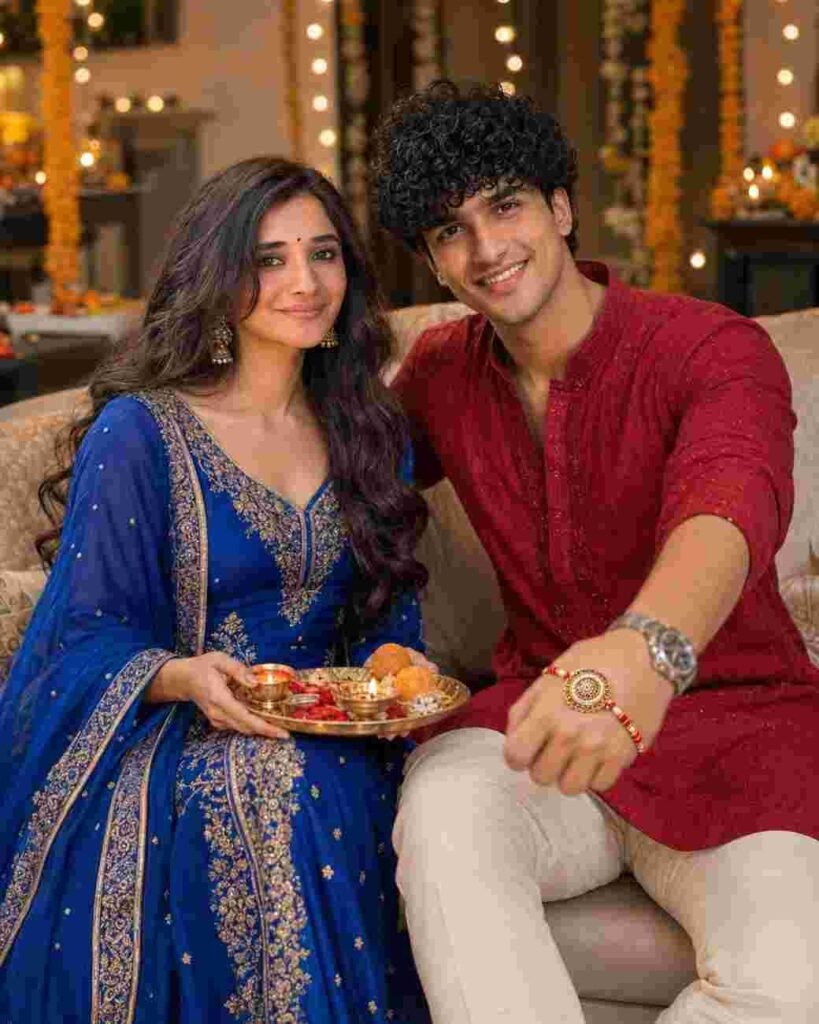
Create an ultra-realistic Raksha Bandhan portrait using the uploaded photo as the exact facial reference. Preserve both siblings’ identity, facial features, skin tone, hairstyle and natural expressions.

Show both siblings sitting comfortably on a luxurious sofa. The brother wears a premium red embroidered kurta, white trousers, luxury watch and bracelet, extending his Rakhi-tied wrist toward the camera so the Rakhi is clearly visible. The sister wears a royal-blue designer Anarkali with elegant dupatta, earrings and bangles, holding a decorated Raksha Bandhan thali and smiling warmly at the camera.

Festive flowers, fairy lights and elegant Indian décor, warm cinematic lighting, realistic skin and fabric texture, DSLR 85mm f/1.8, shallow depth of field, creamy bokeh, HDR, photorealistic 8K, 4:5 aspect ratio.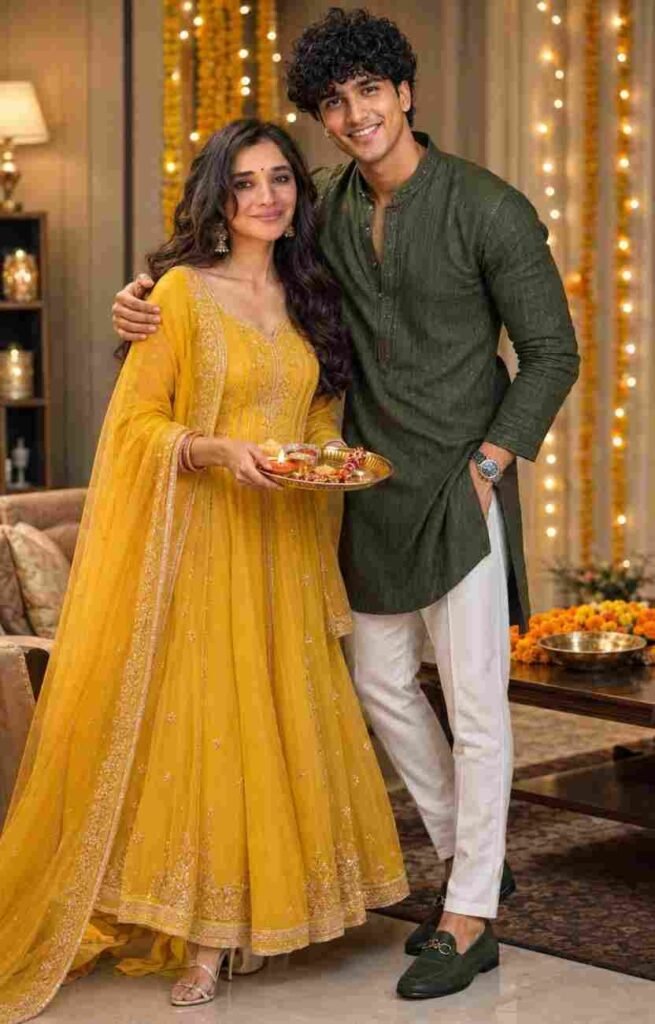
Create an ultra-realistic cinematic Raksha Bandhan portrait using the uploaded photos as exact facial references. Preserve both siblings’ identity, facial features, skin tone, hairstyle, and natural appearance without alteration.

Show the brother in a premium dark-green embroidered designer kurta, white trousers, luxury watch and loafers, standing with his arm affectionately around his sister. The sister wears a royal-yellow embroidered Anarkali with designer dupatta, elegant earrings and bangles, holding a decorated Raksha Bandhan thali with rakhi, diya, kumkum, rice and sweets. Both smile naturally at the camera.

Elegant festive indoor setting, warm golden lighting, luxury décor, soft bokeh, realistic skin and fabric texture, DSLR photography, 85mm f/1.8, cinematic color grading, HDR, photorealistic 8K, 4:5 ratio.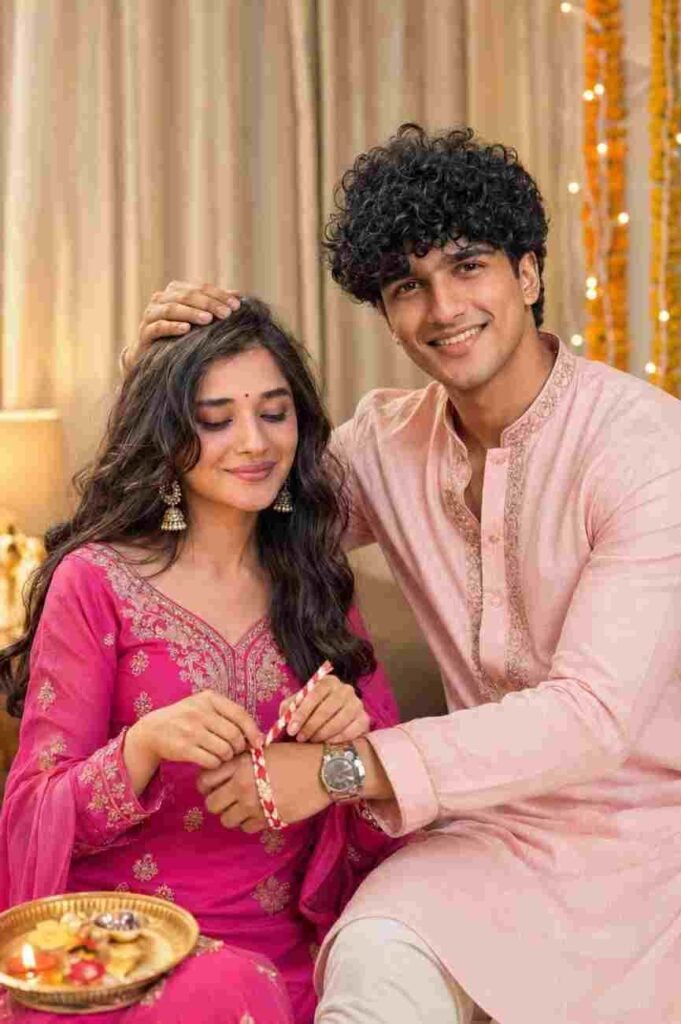
Create an ultra-realistic Raksha Bandhan portrait using the two uploaded reference photos. Strict identity lock: preserve both siblings’ exact facial features, face shape, hairstyle, skin tone, and natural appearance from the references. Do not beautify, reshape, or alter their identities.

The sister wears a bright pink embroidered traditional suit with jhumka earrings and lovingly ties a red-and-white rakhi on her brother’s wrist with a gentle smile and closed eyes. The brother wears a light pink silk kurta with elegant gold embroidery and a wristwatch, warmly placing his hand on his sister’s head with a natural smile.

Warm indoor setting with beige curtains, subtle festive decorations, soft golden lighting, and natural candid emotions. Hyper-realistic DSLR photography, Canon EOS R5, 85mm f/1.2, shallow depth of field, creamy bokeh, realistic skin texture, natural colors, cinematic lighting, premium editorial quality, ultra-detailed 8K.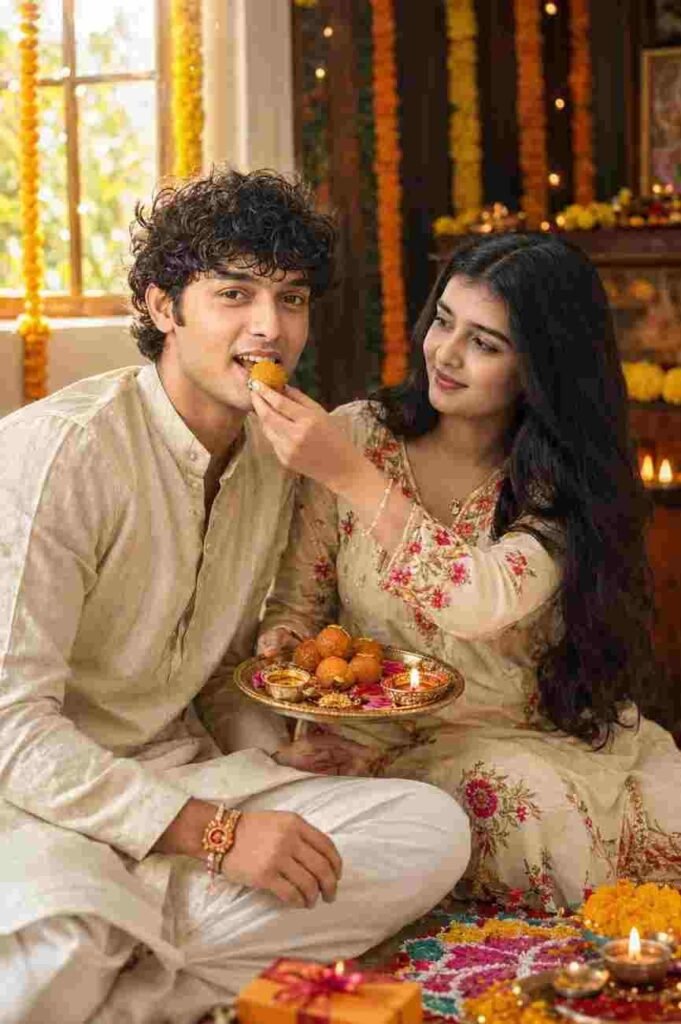
Use the uploaded brother and sister photos as the only identity references. Preserve both faces, hairstyles, age, skin tone, and identity exactly. Create a joyful Raksha Bandhan scene where the sister lovingly feeds a laddu to her smiling brother. Festive Indian background with marigold flowers, diyas, rangoli, traditional outfits, warm golden-hour lighting, realistic emotions, DSLR photography, shallow depth of field, HDR, ultra-detailed, cinematic color grading, 85mm lens, 8K.Tips to Get the Best AI Generated Raksha Bandhan Photo
When I made this kind of photo for the first time, the biggest problem was the reference photo. My sister is very small. So in her separate photos, sometimes her face was turned, and sometimes the light was not right.
Because of this, the AI could not understand the face properly.
Later, we two took a clean selfie together. In that photo, both faces were in front, and the light was also okay. After using that photo, the result became much better.
So you should also try to give a photo where faces are clearly seen. Avoid very dark photos, very blurry photos, or photos where faces are fully covered.
For clothes, you can also give instructions in the prompt like traditional dress, Rakhi, festive outfit, or Indian traditional clothing. This helps the AI understand your wanted environment better.
Common Mistakes to Avoid While Using AI Photo Prompts
- The first mistake is using a very bad reference photo. Even if the prompt is good, if the input photo is not clear, it is hard to get a good result. This happened to me too.
- The second mistake is changing too many things inside the prompt. People who are new to AI editing often write many things together. Because of this, the AI may not understand which instruction is more important.
- Another thing is face match. Especially when making a brother and sister photo, you must check first that your face and the face of your brother or sister stay right.
- If the face does not come out right in a photo, do not use the same prompt again and again, but try again with another clean reference photo.
In my case, this method worked.
Free or Paid AI Tools for Raksha Bandhan Photos
Which tool you will use to make Raksha Bandhan photos depends on your need.
| Topic | Free AI Tools | Paid AI Tools |
| Starting | Good | Good |
| Simple photo editing | Can do | Can do |
| Advanced options | Can be limited | Usually more |
| For new people | Easy | Has a few more options |
| Cost | Free in many cases | Can cost money based on plans |
You can try with the easy AI tool you have first if you just want to make a beautiful Raksha Bandhan picture of a brother and sister.
My Experience While Creating Raksha Bandhan AI Photos
Now let me tell you about my own experience.
When I first did this editing, I thought the picture would be made very easily. But the first time I did not get a good result.
The problem was with the photo of my sister. She is very small, so among the separate photos I had, none were clean. In some, her face was turned, and in some, the light was low.
At first I thought maybe the prompt had a problem. But later I understood that the real problem was not the prompt, but the reference photo.
Then my sister and I took a selfie together. We tried to make sure both faces were clearly seen and the light in the photo was good.
I gave that photo to the AI again and used the same kind of prompt. This time the result was much better than before.
Then I understood one thing. In AI photo editing, having a good prompt is not enough. The photo you give to the AI is also very important.
So if your photo does not come out right the first time, there is no need to be sad. Try changing the reference photo first. Many times, the answer to the problem is right there.
Conclusion
Raksha Bandhan means a beautiful memory of a brother and sister. And now, with the help of AI, there is a chance to style even the simple photos you have in a new way.
But what I understood from my own experience is that while using Raksha Bandhan AI Photo Editing Prompt, you must look at the reference photo along with the prompt.
Keeping the face clean, having good light, and giving the photo of brother and sister properly, these small things can make a big difference in the result.
So take your favorite prompt from the Raksha Bandhan photo editing prompts given below and try it with your photo and the photo of your brother or sister. Stay well, stay healthy, thank you, and Happy Raksha Bandhan.
Frequently Asked Questions (FAQ)
What is the best AI tool for Raksha Bandhan photos?
You can try to make Raksha Bandhan photos using your own picture and prompt with an AI tool like Gemini.
Can I use my own photo with these prompts?
Yes, you can make this kind of AI photo using a clean picture of yourself and your brother or sister.
Are these AI photo prompts free to use?
It does not cost money to use the prompt, but the AI tool you are using may have its own limit or paid option.
Which app is best for Rakhi photo editing?
You can try to make this kind of picture easily with an AI editing tool like Gemini.
What should I do if the AI photo is not correct?
First try again with the same prompt using a cleaner reference photo.