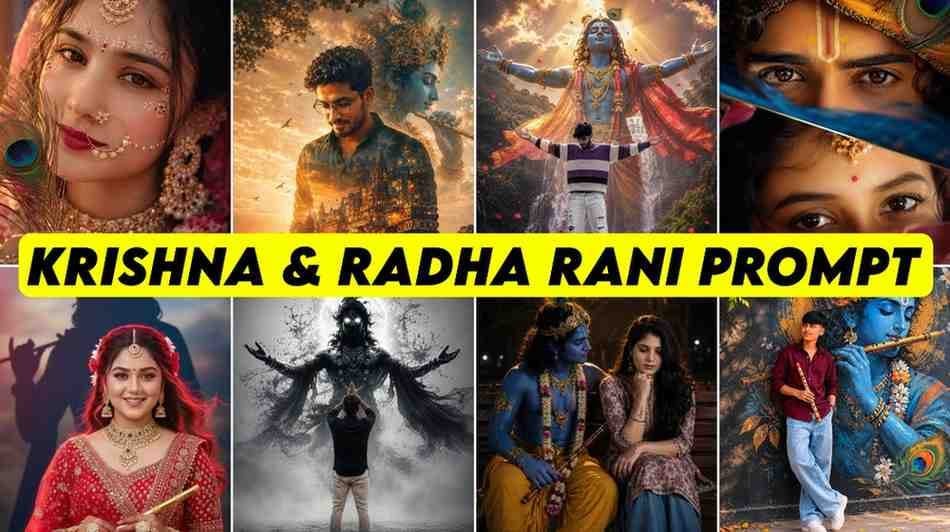
Radha Krishna and Radha Rani AI Photo Prompt is now a topic that thousands of people search for every day. Some people want to make their own photos in Krishna style, and some people want to see a beautiful photo of themselves in Radha Rani style. But most people face the same problem. They do not find a good Prompt. In many places there are Prompts, but they do not work well, or the writing is so hard that new users do not understand what to do.
I also fell into this exact problem at first. After making a Krishna style photo for myself, I saw that Radha Rani style photos were becoming popular very fast on social media. My girlfriend also asked me to make a photo like that for her. But then I understood that finding the right Prompt was the biggest challenge. After searching a lot, I finally found some great Prompts. Then I thought that if I lost so much time, other people must be facing the same problem too. That is why I am writing this full article, so that you do not have to search anywhere else.
In this article you will not only get Prompts. Which AI Tool to use, how to paste the Prompt, how to get good results, where people make the most mistakes, and how to avoid those mistakes, everything will be talked about in very easy words. I have tried to explain in a way so that even if you have never done AI Photo Editing before, you can easily make your favorite photo.
There is another thing I have seen. Many people think that just copying the Prompt will make the exact same photo. In reality it is not like that. The quality of your photo, the light, and the power of the AI Tool also matter a lot for the result. So along with a good Prompt, you also need to know the right steps. In this article I have talked about those things step by step.
Why Radha Krishna AI Images Are Trending
In the last few months, one thing is clearly seen on social media. People now do not want to post only normal Portrait Photos. They want to make something that looks beautiful and catches everyone’s eye. That is why Radha Krishna Photo Editing Prompt became popular so fast.
Especially on Instagram, Facebook, and WhatsApp, many people are changing their profile photos. Some are making photos for Janmashtami, and some are making photos inspired by Krishna or Radha Rani according to their personal choice. In these kinds of photos, traditional clothes, flower decorations, temple background, and soft colors are mostly used. So the photos look very attractive.
When I first saw this trend, I did not think so many people were searching for these photos. But after seeing the same kind of photos again and again on different platforms, I understood that this is not just a short trend. Especially among girls, the interest in Radha Rani AI Photo Prompt is very high. Also for boys, the demand for Krishna Prompt is not less. So now many people are looking for Prompts that can be used to easily make their favorite photos.
Best AI Tools to Generate Radha Krishna Photos
A good Prompt is as important as choosing the right AI Tool. I have used many platforms myself. Not all of them give the same results. Some Tools are easy for beginners, and some Tools are better for users with more experience.
If you are totally new, you can start with Gemini AI. It is easy to use and you can also use Prompts by uploading your own photo. ChatGPT Image Generator also gives many beautiful results, especially when the Prompt is detailed. In Leonardo AI there is more control over style, so it is a good choice for those who want to try different art styles. On the other hand, Bing Image Creator gives a very simple interface and helps to make photos quickly.
In my experience, using Gemini first is the easiest for new users. Because here you just upload a photo and paste the Prompt, and in most cases you get good results. Later, when your experience grows, you can use other platforms. The most important thing is that if you use the same Prompt in different Tools and compare, you will understand yourself which one works best for your needs.
How to Use AI Photo Prompt Step by Step Guide
Many people ask me a question, “I got the Prompt, now how do I use it?” To tell the truth, when I went to make a photo with AI for the first time, I got stuck in this exact place. I had a good Prompt, I had a photo, but I could not understand what to do where. After making mistakes a few times, everything became clear. So here I am trying to explain in a way that even if you have never done AI Photo Editing before, you can understand very easily.
First, copy the AI Photo Prompt that you like the most from this article. Next, open the Gemini app on your phone. Inside the app, tap the plus icon at the bottom or near the chat box. Then select the Gallery option and upload the photo that you want to edit.
Once the photo is uploaded, paste the Prompt you copied earlier into the chat box. If you want, you can also make small changes according to your choice. Like you can add a few extra instructions about clothing color, background, flower type, or lighting. Then just press the Send button.
Wait a few moments. AI will analyze your given photo and Prompt to make a new photo. If you do not like the first result, there is nothing to be sad about. I myself did not get the best result on the first try. I got a much better result just by changing a small line in the Prompt. So if you stay patient and try one or two times, you will usually get very beautiful results.
Radha Krishna AI Photo Prompt Copy and Paste Ready
On many websites you will see Prompts, but there are many unnecessary words in them. Also, some Prompts are so short that AI cannot understand what kind of photo you actually want. So I made Prompts that are simple, clear, and work well on different AI Tools.
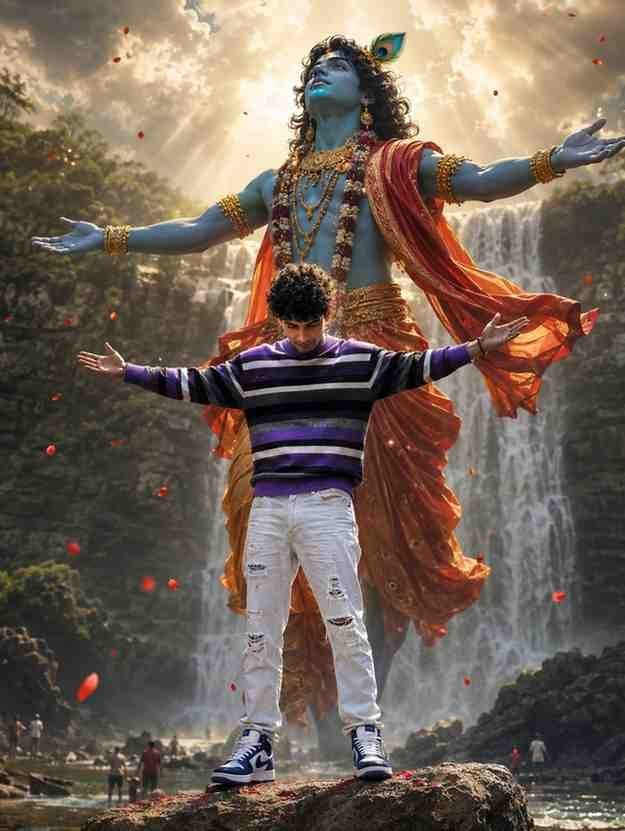
A hyper-realistic cinematic portrait of a 24-year-old man with an athletic build, dark wavy hair, and a neatly trimmed beard standing confidently on a rugged rock with his arms outstretched and head slightly bowed. He wears a purple, white, and black striped sweater, distressed white denim jeans, and chunky blue-and-white sneakers. Towering behind him is a colossal, ethereal Lord Krishna with radiant blue skin, flowing curly hair adorned with a peacock feather, intricate golden jewelry, and elegant red-orange silk robes billowing in the wind. Krishna mirrors the man's open-arm pose, creating a powerful divine connection. A majestic waterfall cascades down towering cliffs surrounded by lush greenery, with tiny human figures visible near the base for scale. Golden heavenly sun rays stream through dramatic clouds, filling the scene with a sacred glow as red flower petals drift through the air. Magical realism, ultra-detailed textures, cinematic depth, dramatic chiaroscuro lighting, volumetric light, HDR, 85mm lens, high-budget fantasy film aesthetic, 8K, photorealistic, razor-sharp focus, 3:4 portrait composition, zoomed-in framing.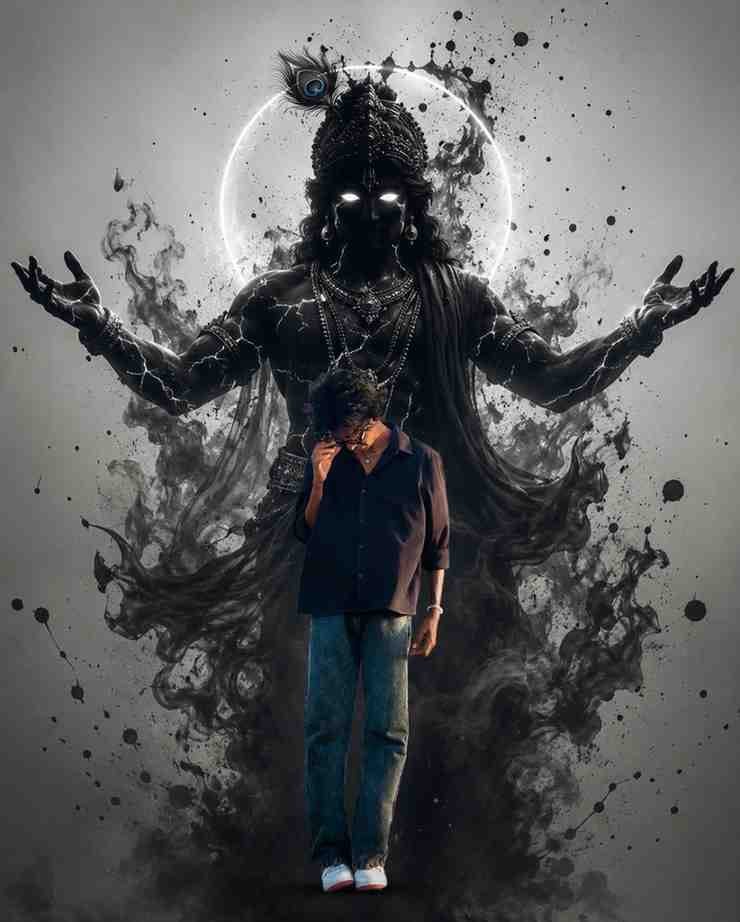
Preserve the uploaded photo exactly as is with zero modifications to the person's face, hairstyle, clothing, pose, expression, or body. Keep the subject centered in the foreground with sharp focus. Replace only the background with a minimal light grey backdrop. Add a large dark silhouette of Lord Krishna floating behind at a distance, slightly blurred, with glowing white eyes, white energy cracks, peacock feather, ornate jewelry, dhoti, arms spread in blessing, and a glowing halo. Surround Krishna with black ink splashes and smoky effects. Cinematic, high-contrast, photorealistic, dark devotional art, IMAX quality, 8K, Instagram 4:5 (1080×1350). Background replacement only.Can both boys and girls use these Prompts?
Of course you can. Many people have a wrong idea about this. Many think that they have to use different AIs or write a completely new Prompt. In reality, it is very simple.
If you are a boy, use the Krishna Prompt. And if you are a girl, using the Radha Rani Prompt is enough. But if you want, you can also change just the character name, clothes, and jewelry parts inside the same Prompt. This removes the need to write a completely new Prompt.
I have also used the same Prompt a few times by changing it slightly. This saved time, and the results were also very good. So instead of searching for a new Prompt every time, changing a good Prompt slightly for yourself is what I found most easy.
Tips to Get More Realistic and HD Results
Many people tell me, “I am using the same Prompt, but I am not getting beautiful photos like others.” I also faced this exact problem in the beginning. At that time I thought maybe there was a problem with the Prompt. Later I slowly understood that just having a good Prompt is not enough. How clear the photo you are uploading is, how the light is, how clear the face looks, these things are also equally important.
In the beginning, I used a photo taken in low light. The result was not very good. Later I tried again using another photo of the same person taken in daylight. Then I understood the difference clearly. So I always say, if possible, use a photo taken in clear light. Make sure the face is not blurry.
There is another thing I always follow. At the end of the Prompt, I add words like Ultra HD, High Detail, Natural Skin Tone, Soft Lighting, Realistic Texture, and Sharp Focus. This makes the AI pay more attention to small details in the photo. But do not write many unnecessary words together. Short, clear, and specific instructions usually give good results.
Let me talk a bit about the background too. Many people write only the character name and end the Prompt. But if you write Vrindavan Garden, Traditional Temple Background, Flower Decoration, Morning Light, or Golden Sunset Lighting, then the photo setting is created much more beautifully. I also got much better results after making these small changes myself.
Finally, remember one thing. If you do not get your favorite photo on the first try, you do not need to change the Prompt completely. Instead, change one line at a time. Sometimes change the description of clothes, sometimes change the light. This way you will slowly understand which kind of instruction works best for your photo.
Common Mistakes to Avoid While Using Prompts
While doing AI Photo Editing, people often make a few common mistakes. I also made many of these mistakes in the beginning. So now when I teach someone new, I tell them these things in advance.
The biggest mistake is using a very short Prompt. Many people just write “Make me Radha Rani” or “Krishna Photo”. Because of this, AI cannot understand what kind of photo you want. As a result, the outcome becomes plain many times. So always give some clear idea about clothes, light, background, jewelry, and photo style.
Another mistake is writing an overly large Prompt. Many people copy lines from different places on the internet and make a huge Prompt. This confuses the AI many times. In my experience, a clear Prompt of medium length works best.
Many people also upload very low quality photos. If you use blurry photos, dark photos, or photos taken from far away, it becomes hard for AI to understand the fine features of the face properly. So if possible, use clear photos taken in good light.
I see another mistake very often. Many people think the Prompt is bad if the first result is not good. But in reality, a big improvement can be made with just a small change. So stay patient and try multiple times. AI Photo Editing is a thing where even a tiny change can make a big difference.
Is It Free? Free vs Paid AI Tools Comparison
Many people have a question in mind, “Does it cost money to make these kinds of photos?” The answer is, not all the time. Currently, many AI Tools can be used for free. But there are some limits. On the other hand, if you pay money to use some platforms, you get more advanced features.
| AI Tool | Free Version | Paid Features | Best for Beginners |
|---|---|---|---|
| Gemini | ✔️ Yes | Limited premium features | ⭐⭐⭐⭐⭐ |
| ChatGPT Image | ✔️ Available (Plan-based) | Higher-quality image generation and increased usage limits | ⭐⭐⭐⭐⭐ |
| Leonardo AI | ✔️ Limited Free Plan | More image generations, advanced style control, and premium features | ⭐⭐⭐⭐ |
| Bing Image Creator | ✔️ Yes | Microsoft Credits for faster image generation | ⭐⭐⭐⭐⭐ |
If I advise someone who is totally new, I will tell them to use Gemini first. Because uploading photos here is easy, and using Prompts is also easy. After practicing for a few days, you can use other platforms. This way you can understand yourself which AI Tool gives the best result for your needs.
Why I Shared All These Prompts in One Place
This part is the most important to me. Because there is a real reason behind writing this article. I made a Krishna style photo for myself. After sharing it on social media, many people liked it. Then my girlfriend told me, “Make a photo in Radha Rani style for me.”
I thought the work would be finished in a few minutes. But then I understood that finding a good Radha Rani Prompt is not that easy. I visited many websites. In some places there were incomplete Prompts, and in some places they were not working at all. After testing many Prompts, I finally found a few really good Prompts.
Then a thought came to my mind. If I lost so much time, other people must be falling into the same problem too. Especially for those who are doing AI Photo Editing for the first time, the topic is even harder. That is why I decided to arrange the Prompts that worked really well in one place. So that nobody has to search for hours and hours anymore.
My aim is not just to give Prompts. I want anyone reading this article to understand the whole process. Which photo to use, where to paste the Prompt, how to make the result better, if everything is in one place in simple language, then things become very easy for new users. From that thought, I made this complete guide.
My Personal Advice to Get Even Better Results
After working with different kinds of AI Prompts for a long time, I have understood one thing. The more clearly you explain to AI, the better the result is. So never write a very short Prompt, and do not add many unnecessary words either. Give clear instructions in simple language.
Take a little time while choosing a photo too. Many people just upload any photo. But if the face is not clearly seen in the photo, if the light is low, or if too many filters are used, then AI cannot work properly. I always use photos where the face is clearly seen and there is normal light.
There is another thing I always follow. Instead of using the same Prompt again and again, I make small changes. Like if I use pink clothes today, next time I use blue or white color. Sometimes I change the flower type, sometimes I change the background. This way, completely new types of photos can be made even from the same Prompt.
Let me give one more small piece of advice. Many people get sad right after seeing the first result. But I never stop at the first photo. Usually I try two or three times. Because many times the second or third result is the most beautiful.
Conclusion
In this full article about Radha Krishna and Radha Rani AI Photo Prompt, I have talked about all the topics that I learned by using them myself. My aim was not just to share a few Prompts. I wanted you to understand the whole process so that even if you do AI Photo Editing for the first time, you do not get stuck anywhere.
If you follow the Prompts and tips in this article step by step, making beautiful photos according to your choice will become much easier. Remember that a good Prompt, a clear photo, and a little patience, these three things are the most important.
I truly hope that this article will save your time and you will not need to search for Prompts on different websites again. When any new trend comes, you can easily make new photos for yourself by following the same method.